
Travel Router 2026: The Best Portable WiFi Routers for Travel Compared
 15 min read
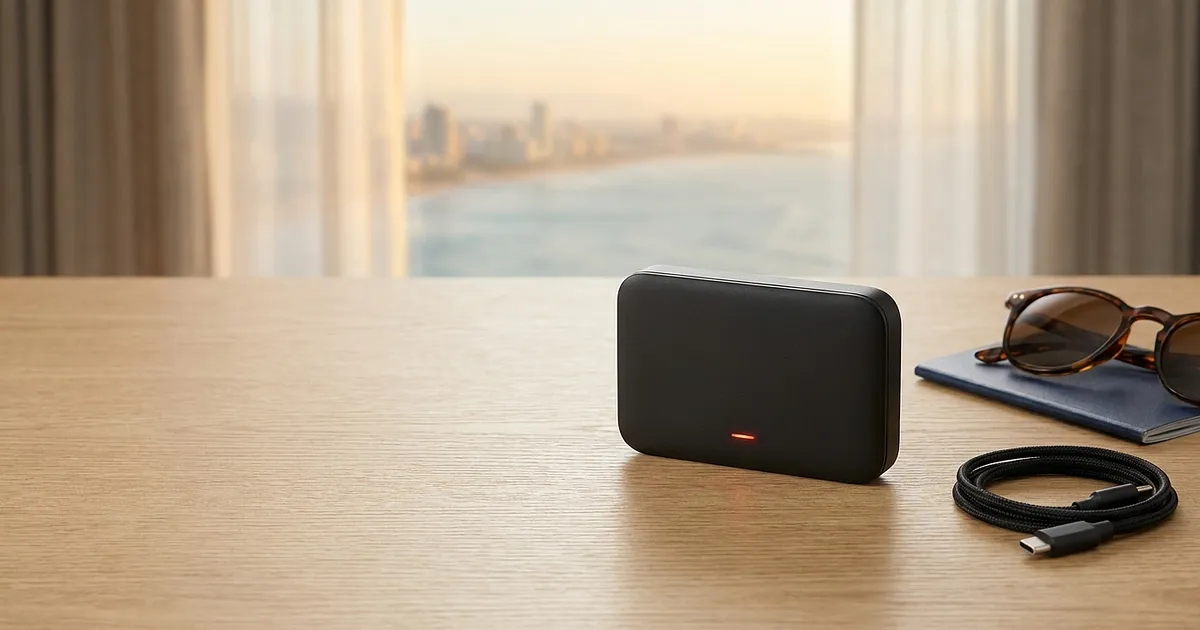
Your phone hotspot works. Most of the time, anyway. Right up until the hotel WiFi cuts you off after two devices, your phone battery dies by lunch, or you get to the holiday rental and realise there's no decent WiFi here at all. That's the moment a travel router starts to make sense, and the choice in 2026 is bigger and more confusing than it's ever been.
The biggest problem: a lot of guides lump two completely different kinds of device together. A small WiFi router that reshares someone else's internet is a very different animal from a router with its own SIM slot that goes onto the mobile network itself. Buy the wrong one and you're left holding a useless little box. So let's sort the categories first, then get to the actual models.
Phone Hotspot or Travel Router? The Honest Comparison
First, the obvious question: why bother with an extra gadget when your phone already has a hotspot?
The hotspot is fine for short and small. One or two devices, sharing café WiFi for an hour, no problem. But leave that hotspot running all day and then look at your phone battery. Right. And once your laptop, a tablet, and your travel partner's phone are all hanging off it too, the connection gets sluggish.
The core difference between the two, confirmed by Yahoo Tech: a phone hotspot turns your own mobile data into WiFi, while a travel router usually reshares an existing connection like hotel WiFi instead. The practical upside: plenty of hotels cap the number of devices per room or per voucher code. The router logs into the hotel WiFi once and then shares that single connection to all of your devices. No second voucher, no rebooking. Done.
Then there's the part almost nobody thinks about: your own password-protected network. Instead of each device sitting exposed on the open hotel WiFi, the router spins up a little home network, same name every time, whether you wake up in Lisbon or Bangkok. Laptop and phone reconnect automatically. And if the router runs a VPN tunnel, the protection covers every device at once, not app by app.
So, roughly:
Phone hotspot: great for short trips, on the move, one or two devices. Costs nothing extra, but eats battery.
Travel router: great for several devices, several days, more security and its own VPN. Costs money and rucksack space.
If you're travelling solo with just a phone and rarely stream anything, honestly, save your money. Travelling as a pair, carrying a laptop, or staying somewhere longer? A router quickly becomes the more relaxed option.
The Two Kinds of Travel Router (You Really Need This Bit)
This is where it gets sorted out, and it's exactly where the old 2020-era guides go wrong. There are two families:
1. Travel routers without a SIM slot. That's most of them. They don't create any mobile internet of their own. They need a source. Usually that's hotel WiFi or an Ethernet cable in a rental, sometimes just your phone hotspot. They take that source and reshare it, more securely and to more devices. The GL.iNet Beryl AX, for example, has no SIM slot. It's a pure WiFi repeater with a VPN, not a cellular router. Don't try to put a SIM card in it, it simply won't work.
2. Travel routers with a SIM slot (MiFi). These have their own slot for a SIM card and a built-in cellular modem. They connect to a 4G or 5G network on their own, no external WiFi needed. Handy anywhere there's no reliable WiFi to lean on, whether that's a rental car, a road trip, or a remote place to stay.
The most common bad purchase? Someone grabs a SIM-less router because it says "mobile," then sits in a WiFi-free rental wondering why nothing works. Remember the rule of thumb: no SIM slot means you absolutely need a data source next to it. Usually that's your phone with an eSIM. More on that below.
Travel Routers Without a SIM Slot: Share and Secure WiFi
The biggest group, and the one that matters for most people. In this travel router test, we're covering four models across two price tiers.
Cheap and Compact: TP-Link TL-WR902AC and GL.iNet Mango
If you want to try a travel router for the first time without dropping 100 € straight away, you start here.
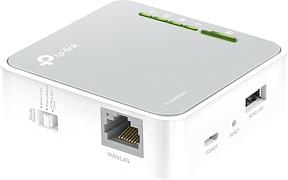
The TP-Link TL-WR902AC is the classic among nano routers, and about as basic a portable WiFi router as you'll find, plus the cheapest one in this comparison. Tiny, WiFi 5 (AC750), runs off USB, costs around 25 € (as of August 2026, amazon.de) and sits on a solid 4.3 stars across more than 5,000 reviews. It can reshare hotel WiFi, work as an access point, or turn a wired connection into WiFi. For the price, hard to beat if you don't need VPN tricks.
TP-Link TL-WR902AC AC750 WLAN Nano Router
The GL.iNet GL-MT300N-V2, known everywhere simply as "Mango," plays in a similar league but has one ace: OpenWrt firmware with WireGuard and OpenVPN ready to go. The catch? It only runs on 2,4GHz with WiFi 4, so it's slow by today's standards. At around 31 € (amazon.de) and with nearly 13,000 reviews at 4.3 stars, it's still the darling of tinkerers and minimalists. If you want a VPN but not a big bill, the Mango's your friend.
TP-Link TL-WR902AC AC750 WLAN Nano Router
View at AmazonAffiliate link. Buying through it earns us a commission; the price stays the same for you.
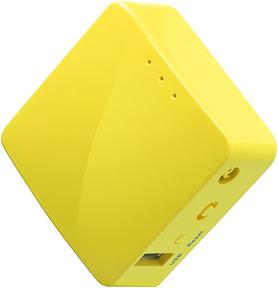
GL.iNet GL-MT300N-V2 Mango Mini Reise-WLAN-Router
View at AmazonAffiliate link. Buying through it earns us a commission; the price stays the same for you.
WiFi 6 With a VPN: GL.iNet Beryl AX and Slate AX
Now the upper tier, for travellers who care about speed and security. Both from GL.iNet, both WiFi 6, both without a SIM slot.
The GL.iNet Beryl AX (GL-MT3000) is my pick for most people. Pocket-sized, WiFi 6, WireGuard and OpenVPN preinstalled with support for more than 30 VPN providers, and a real talent for getting past those annoying hotel login pages. Around 106 € (amazon.de), and at 4.7 stars the best-rated device in the whole lineup. If you buy just one gadget from this article and don't need a SIM in the router, this is it.
GL.iNet GL-MT3000 Beryl AX WLAN 6 Reiserouter
The GL.iNet Slate AX (GL-AXT1800) is the slightly tougher sibling, aimed at frequent travellers and digital nomads who want a stable VPN endpoint and the same local network every time, no matter which hotel they're in. WiFi 6, similar price, around 105 € (amazon.de) at 4.5 stars. Between the Beryl AX and the Slate AX it comes down more to form factor and taste than to any real performance gap.
GL.iNet GL-AXT1800 Slate AX Mobiler Taschen-WLAN 6 Reiserouter mit VPN
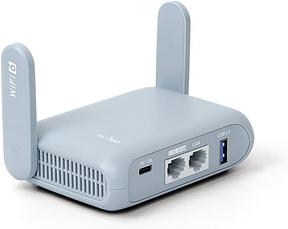
GL.iNet GL-MT3000 Beryl AX WLAN 6 Reiserouter
View at AmazonAffiliate link. Buying through it earns us a commission; the price stays the same for you.
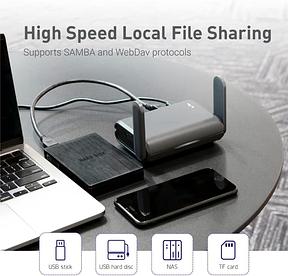
GL.iNet GL-AXT1800 Slate AX Mobiler Taschen-WLAN 6 Reiserouter mit VPN
View at AmazonAffiliate link. Buying through it earns us a commission; the price stays the same for you.
Travel Routers With a SIM Slot: Cellular Right Inside the Router
And now the other family: the WiFi router with a SIM card. Here the SIM card goes into the device itself, and the built-in modem connects straight to the network. No hotel WiFi required, no phone acting as a middleman.
The TP-Link M7350 is the classic mobile LTE hotspot. Built-in battery, small colour LCD, you slot in a 4G LTE SIM and there's your pocket WiFi. Around 56 € (amazon.de), over 9,000 reviews, 4.3 stars. Ideal if you want to run a local prepaid SIM or a SIM-based data plan and you'd rather have a standalone gadget that isn't draining your phone.
TP-Link M7350 Mobiler 4G LTE WLAN Router
Quite a bit more router, and quite a bit more money: the GL.iNet Spitz Plus (GL-X2000). Two SIM slots, a category CAT12 4G LTE modem, plus WiFi 6 and the usual GL.iNet VPN toolkit. For around 154 € (amazon.de, 4.3 stars) you get a full router with cellular on board, one that also works as a small semi-permanent setup in a campervan or a second home. Two SIMs means one for your home network, one local for the country you're visiting, and you switch with a tap.
GL.iNet GL-X2000 Spitz Plus 4G LTE CAT 12 Wi-Fi 6 Dual-SIM-Router
One note on standards: most SIM routers in this bracket run 4G/LTE. Genuine 5G travel routers with a SIM card do exist, from the Netgear Nighthawk range for instance, but they quickly cost double. For travel, LTE is almost always enough, because the local network is the bottleneck, not the router.
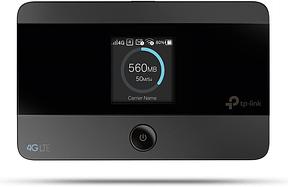
TP-Link M7350 Mobiler 4G LTE WLAN Router
View at AmazonAffiliate link. Buying through it earns us a commission; the price stays the same for you.
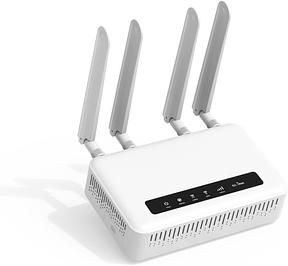
GL.iNet GL-X2000 Spitz Plus 4G LTE CAT 12 Wi-Fi 6 Dual-SIM-Router
View at AmazonAffiliate link. Buying through it earns us a commission; the price stays the same for you.
All Models Compared: The Table
| Model | WiFi | SIM slot | Battery | Price (08/2026) | Rating | Best for |
|---|---|---|---|---|---|---|
| TP-Link TL-WR902AC | WiFi 5 (AC750) | no | no (USB) | ~25 € | 4.3 | beginners, budget |
| GL.iNet Mango (MT300N-V2) | WiFi 4 (2,4GHz) | no | no (USB) | ~31 € | 4.3 | VPN tinkering, minimalists |
| GL.iNet Beryl AX (MT3000) | WiFi 6 | no | no (USB) | ~106 € | 4.7 | most travellers |
| GL.iNet Slate AX (AXT1800) | WiFi 6 | no | no (USB) | ~105 € | 4.5 | frequent travellers, nomads |
| TP-Link M7350 | 4G LTE + WiFi | yes (1×) | yes | ~56 € | 4.3 | own SIM, on the move |
| GL.iNet Spitz Plus (GL-X2000) | WiFi 6 + 4G LTE | yes (2×) | no | ~154 € | 4.3 | dual-SIM, campervan |
Prices and ratings: as of August 2026, amazon.de. They move around, so check the current figure before buying.
WiFi 5, 6 or 7? Which Standard You Actually Need
WiFi 6 sounds better than WiFi 5, and WiFi 7 better still. But do you even need it on the road?
On paper, WiFi 6 (802.11ax) hits roughly 1.4 times the theoretical bandwidth of WiFi 5, according to TechTarget, and it uses OFDMA to serve several devices at once more efficiently. Which is exactly the situation you hit when travelling, when your phone, laptop and tablet all want the same connection.
Now the honest part. Even the older WiFi 5 Slate Plus still does well in the c't test by heise online (a German-language review), delivering several hundred megabits per second over WireGuard VPN. And let's be real: your hotel WiFi in Croatia is throttling you long before the router does. The bottleneck almost never sits in the travel router, it sits in the line the router is plugged into.
My take, and yes, this is an opinion: WiFi 6 is the sweet spot for price and future-proofing in 2026. You can probably skip WiFi 7 in a travel router for now, unless you genuinely want the newest thing. And if money's tight, a WiFi 5 device is perfectly fine for hotel WiFi.
Security: Why You Shouldn't Trust Hotel WiFi Blindly
One reason for a travel router that a lot of people underrate: security.
According to Verbraucherfenster Hessen, a German consumer-protection body, plenty of hotel WiFi networks lack proper encryption. That opens the door to man-in-the-middle attacks and fake "WiFi twins," networks that mimic the real hotel name to skim your data (as of July 2025). WPA3 encrypts each connection separately where it's used, but it's nowhere near universal yet.
How real is this? Per a 2023 Forbes survey summarised by BroadbandSearch, 40% of people on unsecured public networks had already had data compromised. That's two in five.
A travel router with a VPN, like the GL.iNet models, closes exactly this gap. It logs into the hotel WiFi once, then builds an encrypted tunnel that all your devices run through. Instead of securing every phone and laptop separately, you do it once at the router. For online banking or work email on holiday, that's not a luxury, it's just sensible.
Travel Router for Abroad: Think About the Router and the Data Together
Here's the part almost every other guide leaves out. A router is only half the job. The other half is the data, and it doesn't come from nowhere.
Picture the scene from earlier: SIM-less router in a rental, no WiFi anywhere. Now what? There are two clean routes:
SIM-less router plus an eSIM on your phone. You buy a travel eSIM (Saily, Airalo or Holafly, say), activate it on the phone, fire up the phone hotspot, and your travel router shares that connection to everything. Cheap, flexible, and you don't need a second piece of hardware with a SIM slot.
Router with its own SIM slot. You put a physical SIM, or on some models an eSIM, straight into the router (M7350, Spitz Plus). One fewer device in the chain, but pricier hardware.
For most people, route one wins: an eSIM is quick to buy, often much cheaper than roaming, and you've got your phone with you anyway. Germany is well ahead on eSIM availability, by the way. In the Holafly Global eSIM Index 2026, Germany ranks 8th worldwide and 5th in Europe. So there's no shortage of providers and plans.
Which eSIM is cheapest for which country, and when roaming or a local SIM actually beats it instead, we work out for you in detail in our Thailand eSIM comparison, for example. The router only gets you there if you also know what you're feeding it.
Which Model for Whom?
So you don't sit there agonising, here's the short version by traveller type:
Backpackers and penny-pinchers: TP-Link TL-WR902AC or the Mango. Small, cheap, shares hotel WiFi.
Most holidaymakers and families: GL.iNet Beryl AX. WiFi 6, VPN for everyone, top rating.
Frequent travellers and digital nomads: GL.iNet Slate AX for the steady VPN routine.
On the move with no reliable WiFi: TP-Link M7350 with its own SIM.
Road trips, campervans, second homes: GL.iNet Spitz Plus with two SIM slots.
No model is "the best." They solve different problems. The most honest question before buying isn't "which one is fastest," it's "do I have a data source with me, or does the router itself need a SIM."
Conclusion
A travel router isn't a must, but for a lot of people it's the more relaxed way to stay online on the road. Remember the one thing most people trip over: work out first whether you've got a data source with you. If you do, a cheap SIM-less router like the Beryl AX is enough. If you don't, you need either a router with a SIM slot or an eSIM on your phone as the source.
And that's where it all comes together. The hardware is quick to buy, but the smart data choice is what actually saves the money. So before you drop the next router into your basket, look at which eSIM is cheapest for your destination. The router gets you there, the eSIM pays the bill.
All products from this post
The ones we named above are marked; the rest are alternatives in the same category.
Affiliate notice: As an Amazon Associate, we earn from qualifying purchases. Product prices and availability are subject to change.
Frequently Asked Questions
What is a travel router and what do I need it for?
A travel router is a compact WiFi router for the road. It takes an existing connection, hotel WiFi or your phone hotspot, and shares it securely to several devices at once. Some models also have a SIM slot and go onto the mobile network themselves. The point: more devices, more security via VPN, and your own network with the same name every time.
Travel router or phone hotspot: which is better?
Depends. For one or two devices and short use, the phone hotspot is plenty and costs nothing extra, though it drains battery. A travel router pays off when you've got several devices, stay somewhere longer, or want to get around hotel WiFi device limits. It also gives every device VPN protection at once.
Do I need my own SIM card for one?
Only for models with a SIM slot, like the TP-Link M7350 or the GL.iNet Spitz Plus. The large majority of travel routers have no SIM slot. They need an existing source such as hotel WiFi, a cable, or your phone hotspot. The cheapest way to get data on the phone is then usually a travel eSIM.
Does a travel router work in every country?
For sharing WiFi, yes, that's network-independent. For SIM-slot models it depends on the supported cellular bands, though most LTE routers cover the common bands across Europe and many travel destinations. Check the bands for your destination before buying. And you'll still need the right SIM or eSIM on top.
How many devices can a travel router connect at once?
Usually somewhere between 10 and over 30, depending on the model. More important than the raw number is that the router gets around the device limit on many hotel networks: it counts as a single device to the hotel, with all of yours behind it. For families or groups, that's the main win.
Is WiFi 6 worth it in a travel router?
For most people, yes, but not at any price. WiFi 6 handles several devices more efficiently and is the sensible standard in 2026. Still, the bottleneck is almost always the line the router hangs off, not the router itself. A cheap WiFi 5 device is completely fine for hotel WiFi.