Mobile Hotspot vs eSIM: The Honest Comparison for Travelers
 11 min read
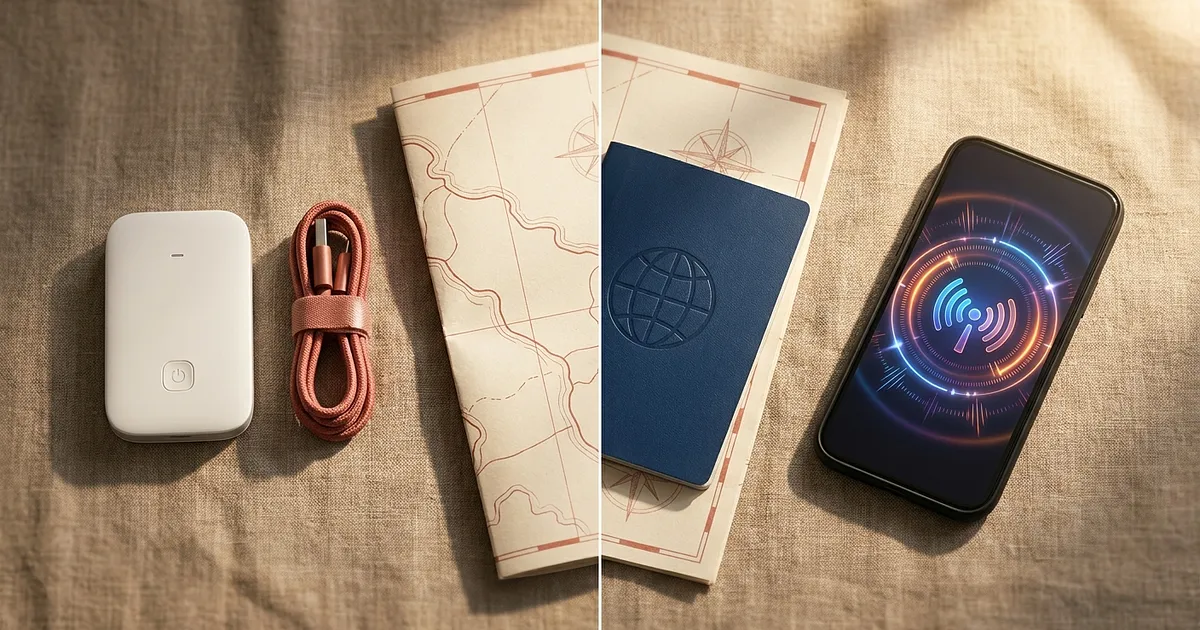
You're almost packed, the trip's a few days out, and one question keeps nagging: mobile hotspot vs eSIM, which one do you actually need? Both get you online abroad, but they feel completely different in your hand. They cost different amounts and they suit very different trips. So I pulled the current research together, so you don't have to wade through ten vendor FAQs to get an answer.
And here's the bit most comparisons quietly skip: neither option is always right. It genuinely depends on your trip.
First, two questions people keep mixing up
When people search "mobile hotspot vs esim," they often mean two totally different things. And the search results happily blend them together.
Question one: can I turn on a hotspot from my eSIM and share it with my tablet? That's a technical question about tethering.
Question two: should I buy a dedicated hotspot device instead of booking an eSIM? That's a buying decision.
This guide mostly answers question two, the buying decision. We'll clear up question one at the end in the FAQ, because otherwise it just rattles around in your head.
How an eSIM actually gets online
A travel eSIM isn't a piece of plastic, it's a digital profile. You scan a QR code before you fly, the profile lands on your phone, and the moment you touch down and switch off airplane mode, you're connected. No shop, no waiting, no deposit.
One detail almost every provider glosses over: most travel eSIMs are data-only profiles. As Airalo explains, they carry no phone number of their own. Calls and texts still run through your home number, as long as your phone does dual-SIM and you keep the old SIM active. For those 2FA codes from your bank, that matters. Worth remembering before you pull the home SIM out.
This path is mainstream now, not a niche trick. According to a forecast from ABI Research, over 633 million eSIM-capable devices will ship worldwide in 2026, with smartphones making up roughly 74 percent of shipments in the most recent breakdown. Your phone almost certainly already does this.
How a mobile hotspot actually gets online
Now the part where half of all buying guides fudge it. A mobile hotspot, meaning a MiFi device or travel router, is not magic internet out of thin air.
It needs a SIM or eSIM of its own. A physical card, a virtual cloud SIM, or a locally bought SIM, whichever way, there's always a mobile plan and a network behind it. The device is just better hardware wrapped around the exact same network and roaming logic your phone already uses. No more, no less.
What the hotspot does better: a stronger antenna, a big battery of its own, and far more simultaneous connections. It broadcasts its own little WiFi network that phones, tablets, and laptops all hop onto. Everyone shares one data pool. That's the whole trick, and for some trips it's worth its weight.
Mobile hotspot vs eSIM: the side by side
So you've got it in one glance. Every price here is a snapshot, not an eternal truth.
| Criterion | Travel eSIM | Mobile hotspot |
|---|---|---|
| Setup | scan a QR code, done in minutes | charge it, set up SIM/data plan |
| Extra device | no, runs on your phone | yes, plus a charging cable |
| Devices at once | 1 (phone), more via tethering | often 5 to 10, premium 30+ |
| Own battery | no, drains your phone | yes, 4 to 14 hours by model |
| Phone number | usually none, data-only | none, also data-only |
| Best for | solo, short, light | group, laptop, long, shared |
Those battery figures aren't guessed marketing numbers, by the way. A battery test from Earth SIMs across eight popular hotspot models found runtimes between 4 and 14 hours, depending on load, signal strength, and whether you're on 4G or 5G. A weak signal eats 30 to 50 percent more power. Handy to know if you'll be traveling at the edge of coverage.
When the eSIM is the better call
For most travelers, honestly. One phone, one person, a weekend or a two-week city break with maps, chat, and a few photos to the cloud. Nothing beats the eSIM there. Nothing to set up but the QR code, nothing to charge, nothing to hand back.
By Simology.io's numbers, solo travelers often save 60 to 110 US dollars a week with an eSIM versus renting a hotspot. Treat the figure as a rough direction, not gospel. But the direction holds: for one person, the eSIM is usually cheaper.
One special case for those of us in Europe. Inside the EU and EEA, thanks to the European Parliament's roam-like-at-home rules, which have been extended through 2032, there are no roaming surcharges anyway. In plain terms: for a trip to Spain or Italy you often need neither a hotspot nor a travel eSIM, your normal plan covers it. The whole question really only bites outside Europe, or when you burn through a lot of gigabytes over the fair-use limit inside the EU.
Short version: if you're unsure and traveling solo, take the eSIM. Nine times out of ten you'll be right.
When a mobile hotspot pays off
There's this one threshold nearly every source agrees on: at three people or three devices sharing a connection, the maths tips toward a hotspot. Below that, the eSIM's simplicity wins. At or above it, one shared device wins.
The reason is simple. Instead of buying and activating four eSIMs for four phones, the whole family hangs off one device and one data pool. Netgear rates its Nighthawk hotspots for over 30 simultaneous connections. Plenty for a whole travel group, kids' tablets included.
The second strong case is the laptop. If you work on the road, take video calls, or upload big files, you don't want to sacrifice your phone battery for it. A hotspot has its own battery and a better antenna for the dead spots in a hotel room. As Freaking Nomads puts it, dedicated routers "often have stronger antennas, better battery life, and can handle more devices without breaking a sweat."
And the third case: long trips. From about three weeks up, data packs add up, and a device with a local SIM or a generous plan often works out cheaper per gigabyte.
The devices: what the market's giving you right now
A quick run through five classes, from cheapest to premium. I haven't tested any of these myself, and the prices and ratings are snapshots from amazon.de in August 2026. Take them as orientation, not a buy order.
The entry point: HUAWEI 4G Mobile WiFi 5
If you just want a simple 4G device and don't feel like spending much, this is the cheapest of the bunch. At 46.99 euros (as of amazon.de, August 2026) with 4.1 out of 5 stars from 213 ratings, it's solid but no-frills. No 5G, no huge battery. For a solo traveler with a tablet, that's often plenty.
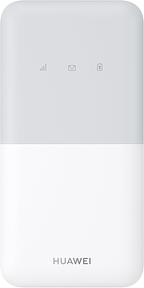
HUAWEI 4G Mobile WiFi 5 Mobiler WLAN-Router
View at AmazonAffiliate link. Buying through it earns us a commission; the price stays the same for you.
The value pick: TP-Link M7350
The classic among cheap MiFis, and by far the most reviewed. 4.3 out of 5 stars from more than 9,100 ratings says a lot about how reliable it is. At 56.29 euros (as of amazon.de, August 2026) you get 4G LTE, a small display for your data use, and enough connections for a small travel group. If I had to point a friend at a starter device, this'd be it.
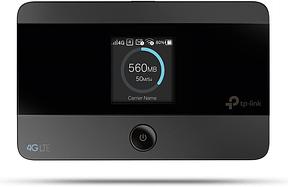
TP-Link M7350 Mobiler 4G LTE WLAN Router
View at AmazonAffiliate link. Buying through it earns us a commission; the price stays the same for you.
The one with the power-bank battery: GL.iNet GL-XE300 Puli
This is where it gets interesting for people who spend time away from a wall socket. The Puli packs a 5000 mAh battery, runs on OpenWrt for the tinkerers, and costs 110.49 euros (as of amazon.de, August 2026) at 4.2 out of 5 stars from 149 ratings. The big battery is the whole argument: a long day out without the connection dying on you at lunch.
One bit of honesty here: a hotspot with a big battery mostly protects your phone battery, because the hotspot function doesn't run on your phone. Actually charging your phone from it, like a power bank, is something only true combo devices do. That's a distinction plenty of people blur.
GL.iNet GL-XE300 Puli 4G LTE Industrierouter, OpenWrt, 5000mAh Akku
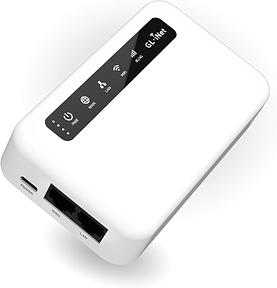
GL.iNet GL-XE300 Puli 4G LTE Industrierouter, OpenWrt, 5000mAh Akku
View at AmazonAffiliate link. Buying through it earns us a commission; the price stays the same for you.
The travel router with WiFi 7: GL.iNet Slate 7 Pro
A different animal. The Slate 7 Pro is a travel router, not a classic MiFi. Meaning: it has no cellular modem of its own, so it needs a connection from somewhere else, like hotel WiFi or a phone tethered over USB. What it does is share that connection over WiFi 7 to all your gear, securely and fast. At 210.37 euros (as of amazon.de, August 2026) and a strong 4.6 out of 5 stars from 108 ratings, it's the pick for frequent travelers who want to lock down hotel WiFi and run every device through one point. Just not as a replacement for a SIM.
GL.iNet Slate 7 Pro (GL-BE10000) WLAN 7 Reiserouter, 6GHz, 2,5G, OpenWrt
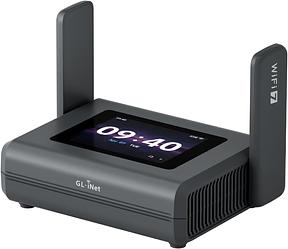
GL.iNet Slate 7 Pro (GL-BE10000) WLAN 7 Reiserouter, 6GHz, 2,5G, OpenWrt
View at AmazonAffiliate link. Buying through it earns us a commission; the price stays the same for you.
The premium tier: NETGEAR Nighthawk M3 5G
When budget matters less and speed is the point, you end up here. The Nighthawk M3 does real 5G with WiFi 6, connects a whole fleet of devices, and at 395.76 euros (as of amazon.de, August 2026) it's the priciest of the lot. 4.1 out of 5 stars from 210 ratings. For a big group, a team on a work trip, or anyone who needs serious bandwidth on the road, it's the no-compromise choice.
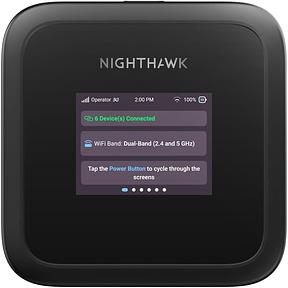
NETGEAR Nighthawk M3 Mobiler 5G Router mit WiFi 6 (MH3150)
View at AmazonAffiliate link. Buying through it earns us a commission; the price stays the same for you.
When both are worth it
Here's a scenario no comparison mentions, and it's worth gold: running both as a backup. On a long trip into a region with shaky coverage, you take a hotspot with a local SIM for the group, plus a cheap travel eSIM on your own phone as a fallback. If one network drops, you're still reachable on the other.
You don't need this for a weekend away. But for a four-week trip through a country where you can't count on anything? You'll sleep better.
Conclusion
The honest answer to "mobile hotspot vs eSIM" isn't a flag you wave, it's a question about your trip. Solo, short, one phone: eSIM. Group, laptop, long haul: hotspot. Everything else is detail that falls out of those two lines.
And once you realize the eSIM fits your trip, the real work starts: which provider, how many gigabytes, which local network. That's exactly what we do at Abroadmode, pitting the options for individual countries against each other, with prices and dates attached. Take a look at the eSIM comparison for your destination before you book.
All products from this post
The ones we named above are marked; the rest are alternatives in the same category.
Affiliate notice: As an Amazon Associate, we earn from qualifying purchases. Product prices and availability are subject to change.
Frequently Asked Questions
Can I turn on a hotspot from an eSIM?
Yes, usually. The eSIM supplies the data, and your phone's normal hotspot function shares it with a tablet or laptop. Two catches: it all runs off your phone battery, and some providers throttle or ban tethering in the fine print. Check the plan details before you book.
Does a mobile hotspot need its own SIM card?
Yes. A hotspot isn't SIM-free internet. It needs a physical SIM, a built-in eSIM, or a virtual cloud SIM, always with a data plan behind it. The coverage and roaming logic is the same as your phone's, the hardware around it is just better.
Is a mobile hotspot cheaper than an eSIM?
For one person, usually not. Solo, you're generally cheaper off with an eSIM. But once three or more people share a device, the cost per head drops and the hotspot becomes the cheaper option. Group size decides this, not the list price.
Can a mobile hotspot charge my phone like a power bank?
Only true combo devices with a big battery are built for that. A normal MiFi protects your phone battery because the hotspot function doesn't run on your phone. That's a different benefit from actively charging it. If you want both, look specifically for a model with charge-out.
Does a travel eSIM have its own phone number?
Mostly not. The vast majority of travel eSIMs are data-only profiles with no number. Calls and texts keep running through your home number, as long as your phone supports dual-SIM and the old SIM stays active. For bank codes and staying reachable, that's worth knowing.